

STEAM
An Orchestra of STEAM Learning
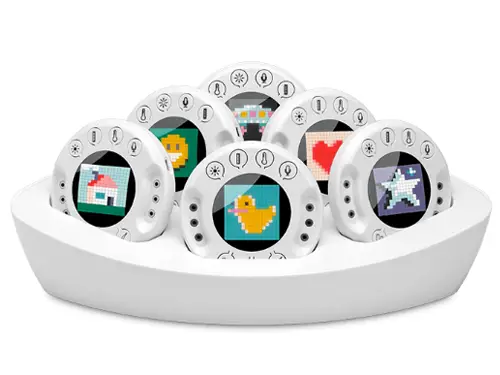
Xploris brings Science, Maths, Coding, Control & Engineering and Creative Digital Art into one handheld classroom device. Pupils can collect real sensor data, analyse it on-screen, and then use code to make something happen — from changing an animation to controlling external outputs.
Science & Maths
Real Data Logging Pupils Can Understand
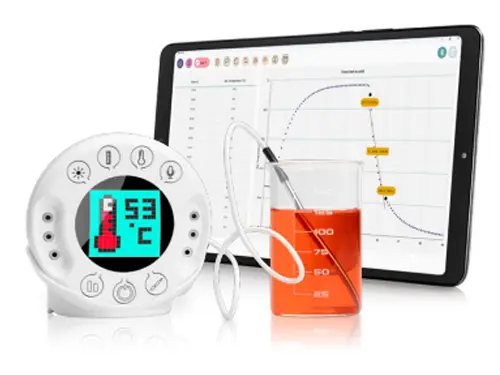
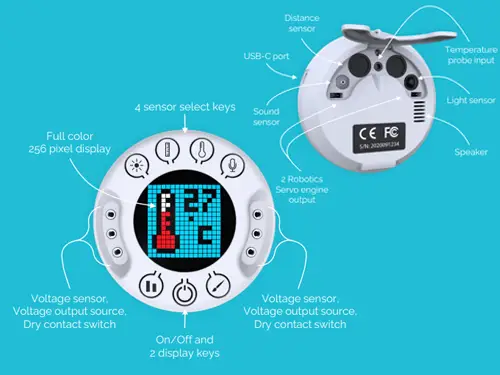
Xploris includes five built-in sensors (temperature, light, sound, distance and voltage), ready to use with no calibration fuss. Pupils can log data, visualise results and discuss what the evidence shows — ideal for practical science enquiry and maths links.
- Capture and store sensor samples for later analysis
- View results as numbers, tables and graphs
- Use markers/annotations to support explanations
Coding
Blockly First… then Python
XploriLab introduces coding through a Blockly/Scratch style editor (perfect for younger pupils), with a Python editor available for progression. This makes it easy to run the same lesson idea at different depths across KS1/KS2 or mixed-ability groups.
- Variables, logic, loops and if/else conditions
- Inputs from sensors, outputs to screen and ports
- Blocks-to-Python progression for confident learners
Control & Engineering
When Data Makes Things Happen
This is where Xploris becomes more than a data logger. Pupils can program outputs based on sensor readings — for example, switching a control, driving a servo, or responding when light/temperature changes.
- Control outputs and voltage outputs for simple projects
- Servo outputs for basic robotics mechanisms
- Great for DT/engineering enrichment and clubs
Creative Digital Art
Pixel Art, Animation & Music
Pupils can create pixel art images and frame-by-frame animations, then connect creativity back to science and coding by triggering art/animation changes from sensor data.
- Pixel art drawing tools and animation features
- Optional soundtracks and simple music composing
- Brilliant cross-curricular hooks for reluctant coders
Lesson Plans
Ready-to-Run Activities
All lesson plans are accessible from the Xploris application, We’ve hosted a selection of Xploris lesson plans directly on our website to make access easier for schools to view prior. *New lesson plans are being added all the time. For the latest versions see the app.
Xploris Lesson Plan Library
Expand each subject below to browse the lesson plans available. All files are hosted on our website for simple access in school.
Science (13)
| Lesson Plan | Description | |
|---|---|---|
| Light and Shade | Compare temperatures in sunny and shaded areas. | View Download |
| Greenhouse Effect | Measure temperatures inside and outside a greenhouse. | View Download |
| Our Heart | Explore how heart rate changes at rest and after exercise. | View Download |
| Match the Graph | Draw a graph and match it with real-time data from the distance sensor. | View Download |
| How Fast? | Measure speed and acceleration during a schoolyard race. | View Download |
| Day & Night | Track temperature and light changes over 24 hours. | View Download |
| Light Reflections | Explore how light reflects off different surfaces. | View Download |
| Build Your Own Battery | Create an electric battery using potatoes and lemons. | View Download |
| How Loud? | Measure sound levels as you move away from the source. | View Download |
| Body Temperature | Observe how skin temperature changes under different conditions. | View Download |
| Light Absorbance | Test which sunglasses absorb the most light. | View Download |
| Temperature Equilibrium | Observe how hot and cold water reach temperature equilibrium when mixed. | View Download |
| Mammalian Diving Reflex | Explore how heart rate adapts while swimming. | View Download |
Coding (10)
| Lesson Plan | Description | |
|---|---|---|
| Hello World | A simple introduction to blocks coding: displaying “Hello World”. | View Download |
| Divisible by Three | Write code to display all numbers from 1 to 100 divisible by 3. | View Download |
| Fibonacci Explorer | Design code to display the Fibonacci sequence. | View Download |
| Fractions | Draw 4 still images of fractions and use code to display and explain fractions concepts. | View Download |
| Geometry | Write code to display a set of large to small rectangles in different colors. | View Download |
| My Thermometer | Use code to create a thermometer between 20–30°C. | View Download |
| Scrolling Arrow | Use code to scroll an arrow to imitate moving forward. | View Download |
| Distance Indicators | Display up and down arrows to indicate changing distances. | View Download |
| Chess Board | Use loops and X,Y plot commands to draw a chessboard pattern. | View Download |
| Flashing Star | Display a flashing white star at random X,Y coordinates. | View Download |
Mathematics (4)
| Lesson Plan | Description | |
|---|---|---|
| Divisible by Three | Write code to display all numbers from 1 to 100 divisible by 3. | View Download |
| Fibonacci Explorer | Design code to display the Fibonacci sequence. | View Download |
| Fractions | Draw 4 still images of fractions and use code to display and explain fractions concepts. | View Download |
| Geometry | Write code to display a set of large to small rectangles in different colors. | View Download |
Control (3)
Art (7)
| Lesson Plan | Description | |
|---|---|---|
| Let’s Draw an Elephant | Create a still image of an elephant. | View Download |
| Changing Hearts | Create simple animations of hearts changing colors. | View Download |
| Character Animation | Use layers to design and animate moving characters. | View Download |
| A Boat on the River | Use animation layers to create a sailing boat in motion. | View Download |
| Flying Bird | Create an advanced yet simple multi-layer bird animation. | View Download |
| Symmetry Art | Design still images with perfect one-axis symmetry. | View Download |
| My First Composition | Composing “Happy Birthday” and add it to a birthday cake animation. | View Download |
Need help choosing a good starting point for your year group or staff training? Email us here.
Ask for the UK lesson plan pack
UK Supply & Support
Class Sets, Training and Ongoing Help
As the UK reseller, we can advise on the right bundle (single devices or class sets), run onboarding, and help you plan activities that fit your timetable — from a single STEM day to a term of enrichment.
Email: info@schoolsupplier.co.uk
Frequently Asked Questions:
Q: What age range is Xploris designed for?
A: Xploris is designed for K–6 / primary classrooms, with activities that scale from simple sensing to coding and control projects.
Q: What sensors does Xploris include?
A: Xploris includes five built-in sensors: temperature, light, sound, distance and voltage.
Q: Do pupils need to start with Python?
A: No — pupils can begin with Blockly/Scratch style blocks and progress to Python when ready.
Q: Can it control external devices?
A: Yes — Xploris supports control outputs and servo outputs for simple engineering/robotics style projects.
Q: Is Xploris available across the UK?
A: Yes — we supply and support UK schools. Email info@schoolsupplier.co.uk.